# Inbank Calculator Guide for Lithuania
Documentation version 1.00, 20.11.2025
Here at Inbank we strive to help our partners sell more by simplifying purchases and making financing more accessible to customers. For this reason, we have built a plug-and-play calculator solution for our merchants. Just pick the calculator format suitable to your website, follow the simple steps below and start displaying monthly payments to your customers. This added feature will boost your conversion and sales.
- [Adding the Calculator to a Page](/api/js-calculator-flow/#section/adding-the-calculator-to-a-page)
- [Configuring the Calculator](/api/js-calculator-flow/#section/Configuring-the-Calculator)
- [Inbank Calculator Views](/api/js-calculator-flow/#section/Inbank-Calculator-Views)
For questions regarding the Inbank calculator, contact us at integration@inbank.lt
Note that you need to contact your Inbank representative for the calculator to appear on the pages of your site. The domain, where the calculator is used, needs to be whitelisted by Inbank.
# Adding the Calculator to a Page
You can add the calculator to any webpage by simply using a JS script. The website platform of your site defines how the script can be added to all product pages (or checkout page if needed).
Example of the calculator script:
```html
```
Note that you need to contact your Inbank representative for the calculator to appear on the pages of your e-shop. The domain, where the calculator is used, needs to be whitelisted by Inbank.
# Configuring the Calculator
There are multiple parameters that can be configured, so that the calculator looks and works as you expect it to. Mandatory configuration parameters are marked with \*.
|Parameter|Description|
| :- | :- |
|layout|The layout of the calculator, which defines its look and size. Available options:
default - for Hire Purchase payment products. Examples of this layout are available in [Hire Purchase Calculator](/api/js-calculator-flow/section/inbank-calculator-views/hire-purchase-calculator). Please note, this layout is currently available only for Lithuania. moki - for Moki payment products. Examples of this layout are available in [Moki Calculator](/api/js-calculator-flow/section/inbank-calculator-views/moki-calculator). Please note, this layout is currently available only for Lithuania. small-loan - horizontal layout for Small Loan payment products. Examples of this layout are available in [Small Loan Calculator](/api/js-calculator-flow/section/inbank-calculator-views/small-loan-calculator). Please note, this layout is currently available only for Lithuania. small-loan-horizontal - horizontal layout for Small Loan payment products. Examples of this layout are available in [Small Loan Calculator](/api/js-calculator-flow/section/inbank-calculator-views/small-loan-calculator). Please note, this layout is currently available only for Lithuania.|
|variant\*|The type of payment product to be used in the calculations. Currently, this value needs to be set to 'calculator-indivy-plan'.|
|shop_uuid\*|A unique code that is used to identify your site in Inbank systems. The `shop_uuid` is provided by Inbank.|
|product_code\*|The product code, which defines all the parameters and rules for the monthly payment calculation. The `product_code` is provided by Inbank.|
|amount\*|The price of the product. If the price is smaller or bigger then allowed in the payment product configuration, an error will be shown to the customer.
You need to define in your e-commerce platform how the calculator will get the price of the product automatically from the product page. In the example [provided above](/api/js-calculator-flow/section/adding-the-calculator-to-a-page), the amount is set to a static value. However, it is expected that the amount is taken from the product page.
For example, in WordPress with the WooCommerce e-commerce plugin the price can be extracted like this: Have the product defined as ```$product``` in the .php file in which you want to add the calculator. When assembling the calculator script, replace the `amount` value with ```get_price(); ?>``` as follows: ```amount: get_price(); ?>```|
|template|Whether the customer will be able to edit the loan amount in the calculator modal. If the `template` parameter is not set, the calculator with an uneditable loan amount is shown. Available options:
`editable_amount` - template that allows the customer to change the loan amount in the calculator modal `no_editable_amount` - template that does not allow the customer to change the loan amount in the calculator modal|
|mode|The background color of the calculator. By default, this parameter is set to `purple`. Available options:
`purple` `lavender` `white`|
|lang|The language in which texts in the calculator are shown. Available languages are `en`, `lt`, `lv`, `et`, `cs` and `ru`. If the language is not indicated, the default value `en` is used.|
|region\*|The environment to which the calculator is connected.
Estonia: `ee1` for demo/test environment `ee` for the production environment
Latvia: `lv1` for demo/test environment `lv` for the production environment
Lithuania: `ltdemo` for demo/test environment `lt` for the production environment
Poland: `pl1` for demo/test environment `pl` for the production environment
Czechia: `cz1` for demo/test environment `cz` for the production environment|
|URL|The link to the calculator library in either demo or live environment. The link is set as the last element of the script. Available options:
demo- https://demo-calculator.inbank.eu/api/calculator live - https://calculator.inbank.eu/api/calculator|
# Inbank Calculator Views
## Hire Purchase Calculator
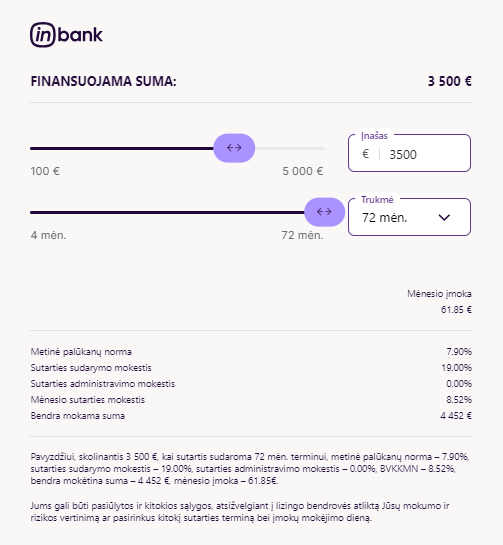
Depending on the width available to the calculator, it will have one of the following sizes:
- 300 x 125
- 402 x 150
 Once the user clicks the button within the calculator, an additional modal will be displayed with a maximum width of 640px.
 ## Moki Calculator
The Moki calculator has fixed dimensions of 300 x 125.
## Moki Calculator
The Moki calculator has fixed dimensions of 300 x 125.
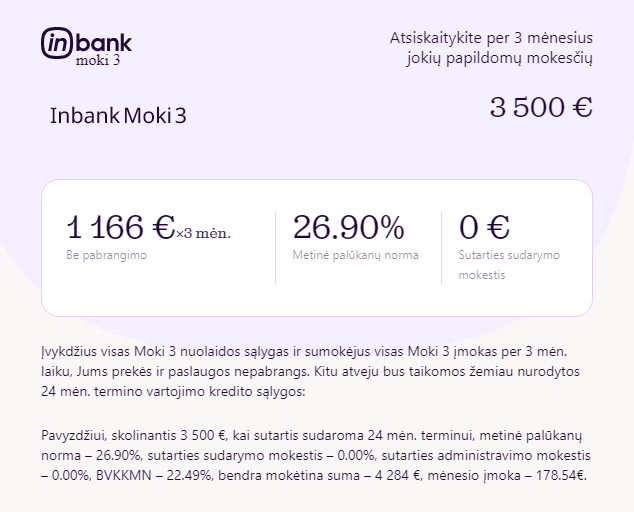
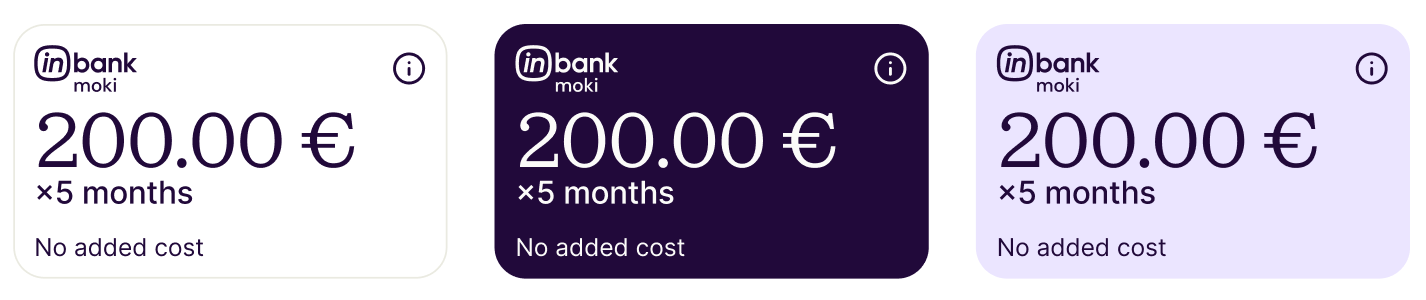 Once the user clicks on the calculator, an additional modal will be displayed with a maximum width of 640px.
 ## Small Loan Calculator
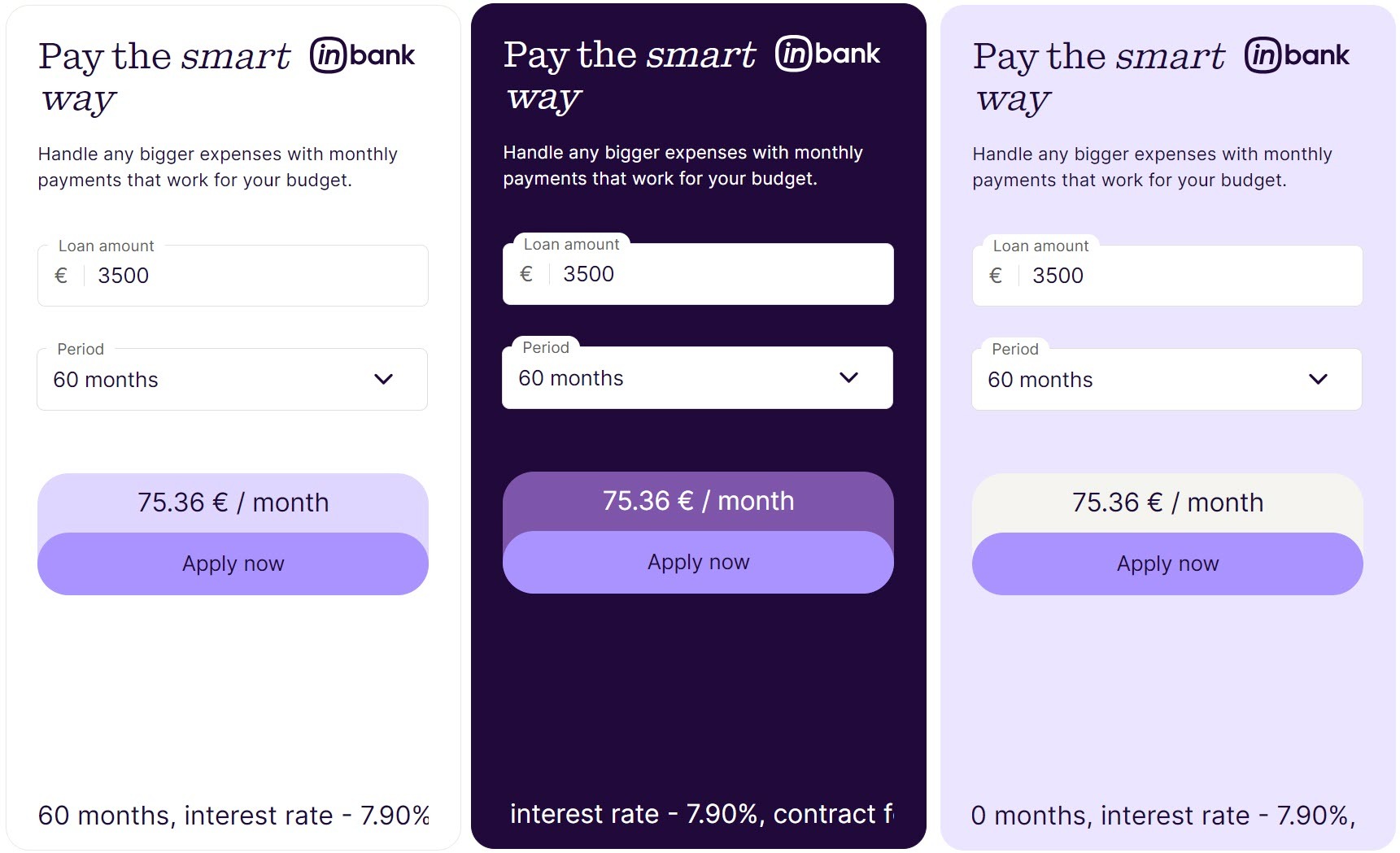
There are two layouts available for the Small Calculator with the following sizes:
- small_loan_horizontal with dimensions 650x350
- small_loan with dimensions 350x650
Please note that the small_loan_horizontal version will switch to 350x650 dimensions automatically for screens too narrow to accommodate its usual dimensions.
## Small Loan Calculator
There are two layouts available for the Small Calculator with the following sizes:
- small_loan_horizontal with dimensions 650x350
- small_loan with dimensions 350x650
Please note that the small_loan_horizontal version will switch to 350x650 dimensions automatically for screens too narrow to accommodate its usual dimensions.

 ## Servers
Demo environment
```
https://demo-api.inbank.ee
```
Live environment
```
https://api.inbank.ee
```
## Security
### bearerAuth
Type: http
Scheme: bearer
## Download OpenAPI description
[Inbank Calculator Guide for Lithuania](https://docs.inbank.eu/_bundle/api/js-calculator-flow.yaml)
## Servers
Demo environment
```
https://demo-api.inbank.ee
```
Live environment
```
https://api.inbank.ee
```
## Security
### bearerAuth
Type: http
Scheme: bearer
## Download OpenAPI description
[Inbank Calculator Guide for Lithuania](https://docs.inbank.eu/_bundle/api/js-calculator-flow.yaml)