WooCommerce Plugin Guide
Plugin version 2.6.6, 20.05.2026
Here at Inbank we strive to help our partners sell more by simplifying purchases and making financing more accessible to customers. For exactly this reason we offer a number of buy-now-pay-later (BNPL) solutions.
The Pay Later Platform by Inbank connects partner e-shops with our e-POS solution With e-POS, partners only need to add Inbank as a payment method and Inbank will take care of all the rest. Customers are redirected to the e-POS environment to complete the financing of the purchase. After a successful financing process we redirect the customer back to you.
Inbank e-POS is supplemented with Inbank Partner Portal where merchants can see the overview of submitted credit applications, create applications for customers and conduct contract withdrawals.
If you have any questions regarding the Inbank WooCommerce plugin, just contact us and we will be happy to help:
- Estonia - integration@inbank.ee
- Poland - integration@inbank.pl
- Latvia - integration@inbank.lv
- Czech Republic - integration@inbank.cz
- Lithuania - integration@inbank.lt
The Pay Later Platform by Inbank has been tested with the StoreFront theme for WooCommerce. The Pay Later Platform by Inbank supports WordPress version 4.7 or later and WooCommerce version 2.4.6 or later.
You can find the list of available Inbank products here.
| Version | Date | Updates |
|---|---|---|
| 2.1.6 | 09.12.2024 | Added Inbank Hire Purchase Lithuania payment product. |
| 2.1.8 | 21.05.2025 | Added Green Energy product support. |
| 2.2.0 | 17.06.2025 | Added Inbank Moki Lithuania payment product. |
| 2.3.1 | 06.08.2025 | Added Inbank HP Flex product for EE and LV. |
| 2.3.2 | 18.09.2025 | Added Changes to Moki1 product. |
| 2.4.0 | 22.09.2025 | Added Inbank HP Flex product for PL. |
| 2.5.0 | 01.10.2025 | Removed Inbank Pay next month product. |
| 2.5.1 | 08.10.2025 | Fixed price range validation. |
| 2.5.2 | 23.10.2025 | Bugfixes. |
| 2.5.3 | 07.11.2025 | Fixed bug related to the fact that we provided null value to number_format function. Now it cannot accept null value. |
| 2.5.6 | 14.11.2025 | Bugfixes. |
| 2.5.7 | 17.12.2025 | Fixed problem with getting inbank logo for PL HP flex. |
| 2.5.8 | 29.12.2025 | Added Polylang support. |
| 2.5.9 | 31.12.2025 | Bugfixes. |
| 2.5.10 | 12.01.2026 | Fixed issue with product restrictions on admin page. |
| 2.5.12 | 23.01.2026 | Remove not used param from in POS session. |
| 2.6.1 | 19.03.2026 | JS Calculators added to plugin. |
| 2.6.2 | 06.04.2026 | Fix Moki product setup. |
| 2.6.3 | 20.04.2026 | Update product activation to depend from activation period of the product. |
| 2.6.4 | 04.05.2026 | Fix save product issue. |
| 2.6.5 | 18.05.2026 | Product setup fix. |
| 2.6.6 | 20.05.2026 | Category restriction saving fix. |
You can download the latest version of the plugin from here. To install the Pay Later Platform by Inbank plugin you just need to follow these steps:
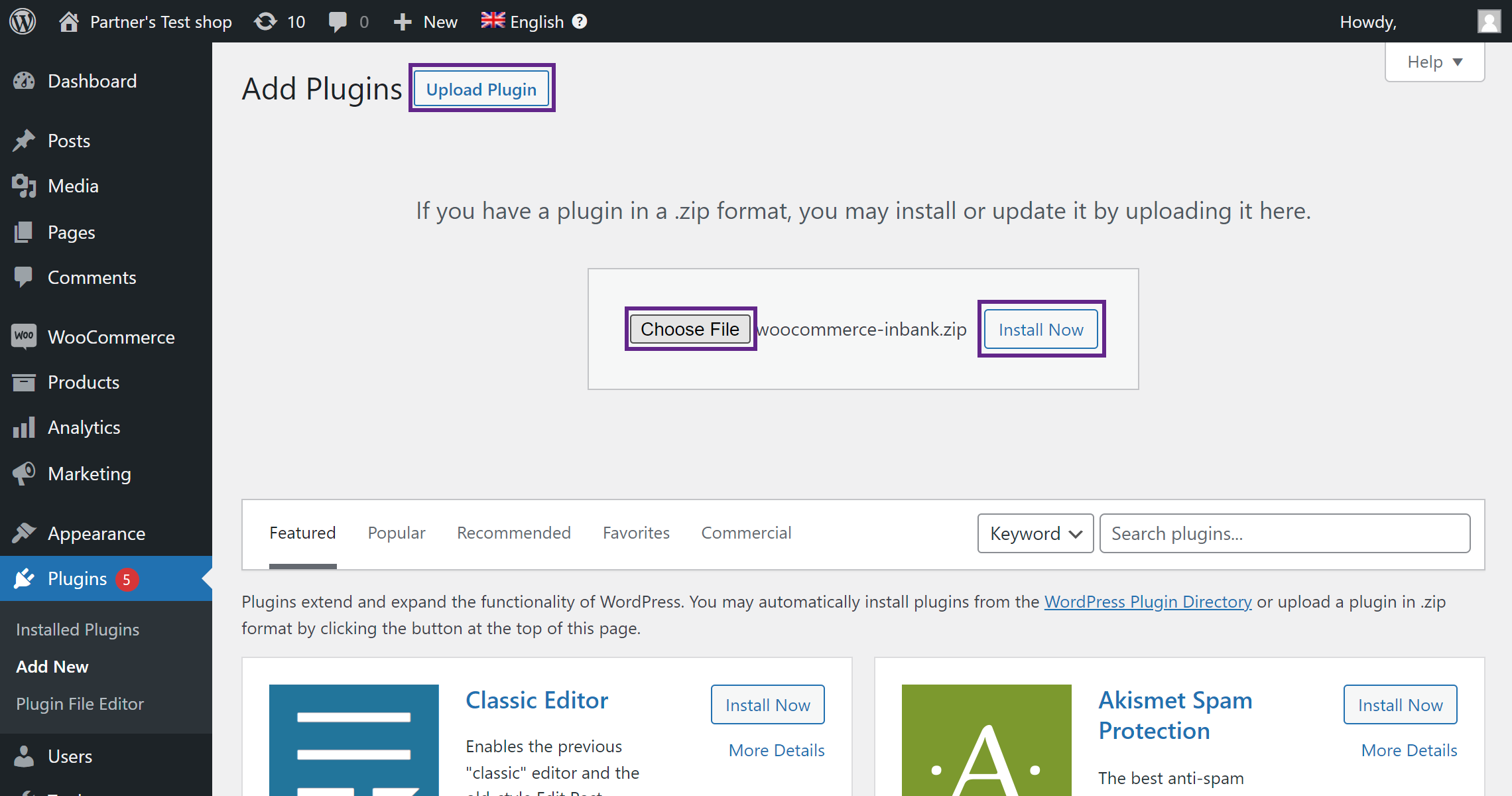
- Go to Plugins > Add new.
- Click the Upload plugin button at the top of the page.
- Click Choose File and select the plugin in .zip format.
- Click Install Now to start the installation process.
- Once the plugin is installed, click Activate Plugin.
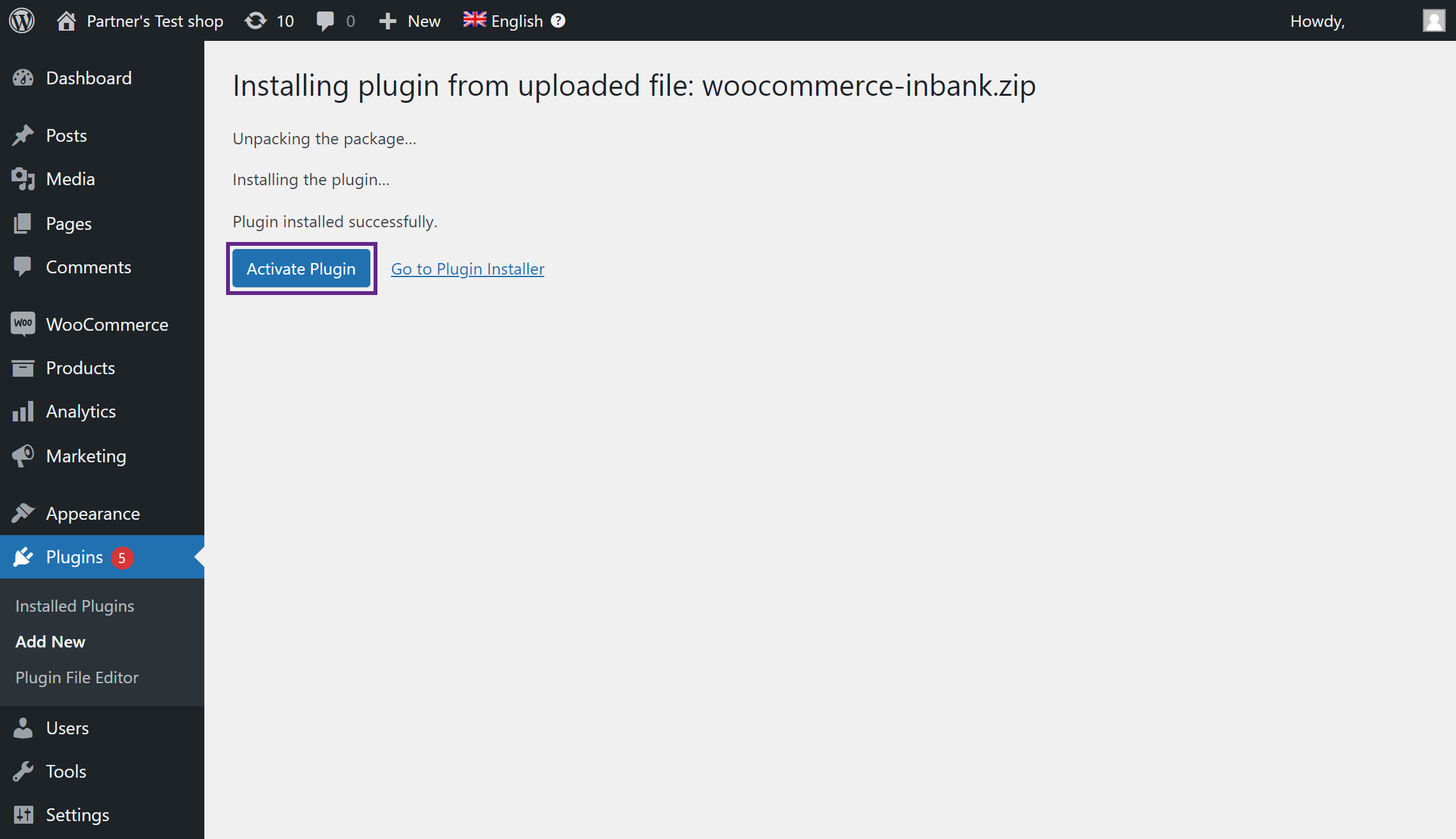
And that is it! The Pay Later Platform by Inbank plugin is ready for configuration.
After successful installation of the Pay Later Platform by Inbank, you can configure Inbank products as payment methods in your back office.
Pay Later Platform configuration is done at Settings > Inbank.
The module includes the following Inbank payment methods:
- Inbank Hire Purchase Estonia
- Inbank Split into parts Estonia
- Inbank Hire Purchase Poland
- Inbank Hire Purchase Latvia
- Inbank Split into parts Latvia
- Inbank Hire Purchase Czech Republic
- Inbank Green Energy Czech Republic
- Inbank Hire Purchase Lithuania
- Inbank Moki Lithuania
- Inbank HP Flex Estonia
- Inbank HP Flex Latvia
- Inbank HP Flex Poland
The module overview page at Settings > Inbank includes the list of all the Inbank payment options added.
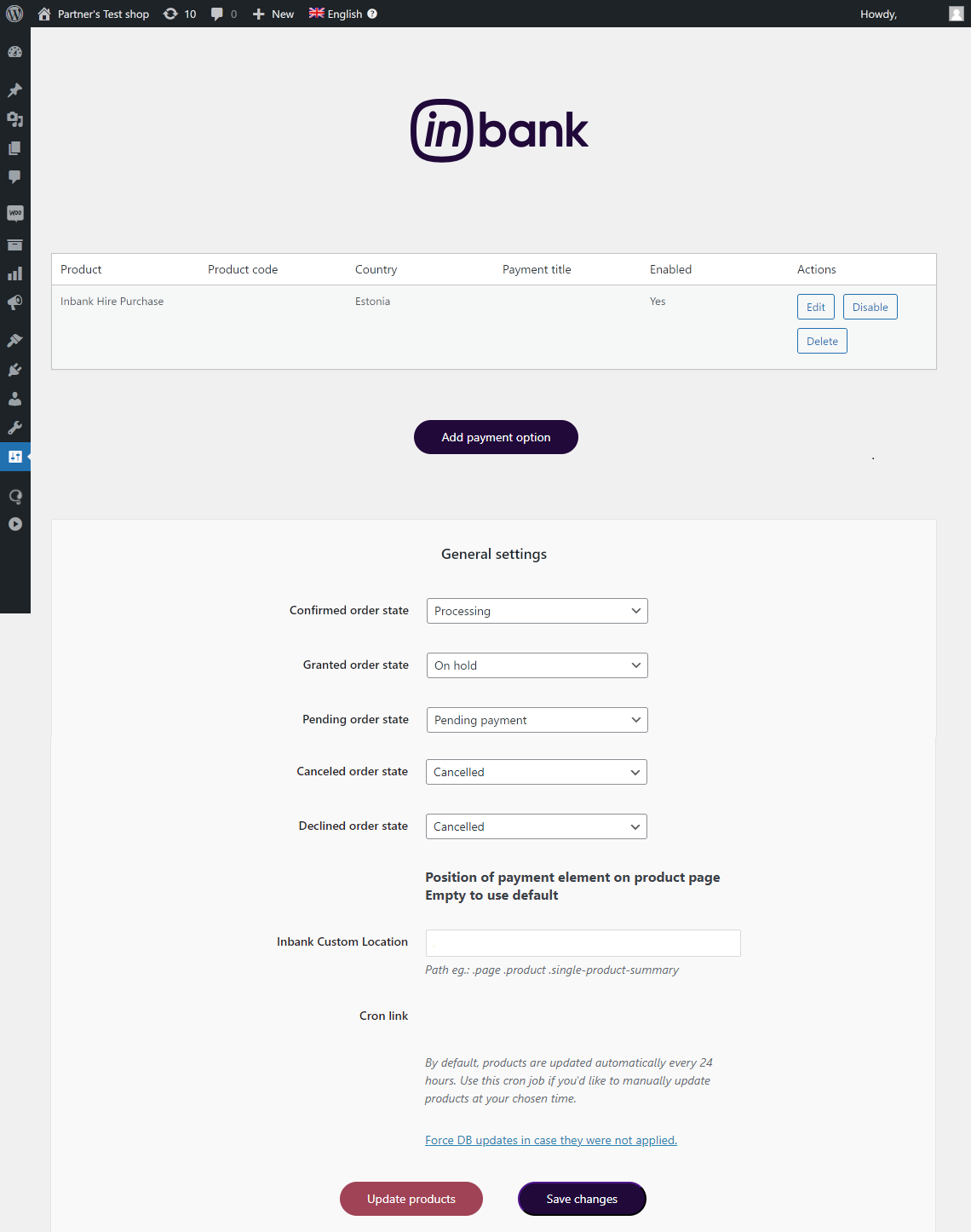
Here several actions regarding added payment options are available:
- Click Edit next to a payment option to make changes to its configuration.
- Click Enable / Disable next to a payment option to enable/disable it.
- Click Delete next to a payment option to delete it.
On the module overview page you can also change the statuses used by the module to better fit your business logic.
In the General Settings section you can customize which statuses the module sets for:
- Confirmed order state - for cases when the purchase was successfully financed by Inbank
- Granted order state - for cases when the credit was granted by Inbank, and contract activation awaits partner approval
- Pending order state - for cases when the purchase is awaiting financing by Inbank
- Cancelled order state - for cases when the order has been canceled
- Declined order state - for cases when the order has been declined
You can also customize the calculation's position shown on the product page using the Inbank Custom Location field. To use this functionality, select Custom action: woocommerce_inbank_custom as the Calculation position in the payment product settings, and specify the path that defines the calculation's custom location in Inbank Custom Location. The calculation will appear under the element specified in this field.
By default the data retrieved from Inbank over API is updated every 24 hours. If you would like to run the data update at a different interval, the General Settings section includes the cron job link which can be used for that. We recommend updating data once every 24 hours, from 00:00 AM to 06:00 AM. Additionally, under the General Settings section you can click the Update products button for a one-time product data update at any time you'd like.
New payment options are added via clicking the Add Payment Option at Settings > Inbank
Depending on the Inbank branch(es) you are cooperating with, you need to configure the payment products for Estonia, Poland, Czech Republic, Latvia or Lithuania. You can offer one of the available products or several, depending on the agreement you have with Inbank.
The following configuration parameters are predefined by Inbank:
- Title
- Maximum order amount
- Minimum order amount
- Period
- Additional details
Note that the predefined values will be updated if they change on the Inbank side. The exceptions are the Title and Additional details values which are customizable. The Title and Additional details are updated if set to default, but are not updated if they have been customized.
For more information on updates, refer to the Updates section.
Adding a new Inbank payment method to the module configuration is a simple two-step process.
On step 1 you need to set the keys and product code required for the functioning of the module and the mode in which this payment product is to be available: live or test.
Inbank representatives will provide you all the data required for this step. Make sure to fill in all the fields correctly, as they are essential to the configuration of Inbank payment products.
On step 2 you can review your configuration and set a couple additional options available in the module.
To start adding a new Inbank payment product, click Add Payment Option at Settings > Inbank
Configuration settings are similar for all payment products: Inbank Hire Purchase Estonia, Inbank Split into parts Estonia, Inbank HP Flex Estonia, Inbank Hire Purchase Poland, Inbank HP Flex Poland, Inbank Hire Purchase Czech Republic, Inbank Green Energy Czech Republic, Inbank Hire Purchase Latvia, Inbank Split into parts Latvia, Inbank HP Flex Latvia, Inbank Hire Purchase Lithuania and Inbank Moki Lithuania.
The product code set during configuration defines the credit conditions available to customers and also automatically sets the following parameters:
- Title
- Maximum order amount
- Minimum order amount
- Period
- Additional details
Step 1 includes the essential parameters needed for the payment option setup. Inbank representatives will provide you all the information needed at this step.
After you add the necessary data, click Next to proceed to step 2 where you review the configuration and can set a number of additional parameters for the payment option.
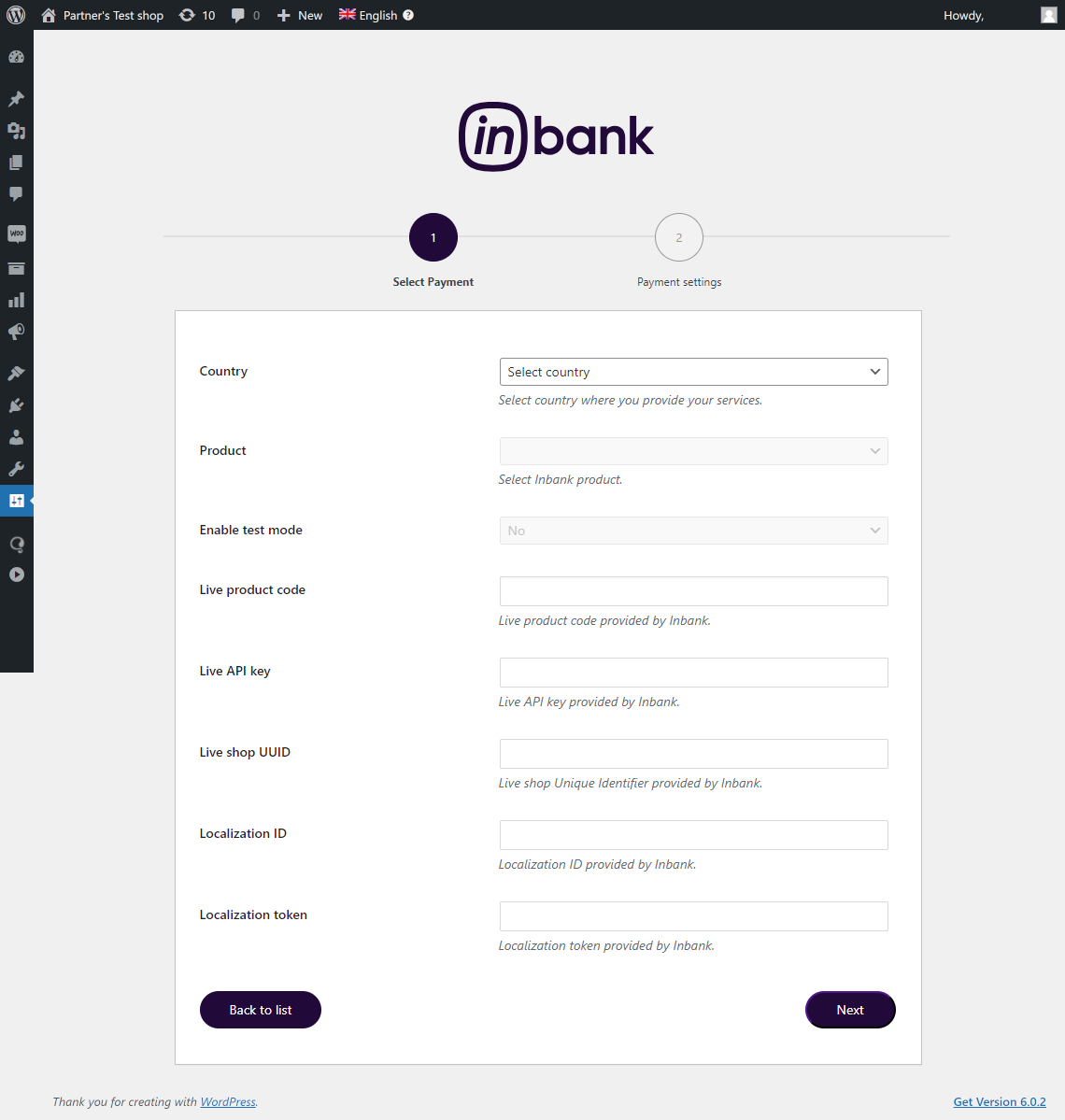
| Field | Description |
|---|---|
| Country | The market for which you wish to add an Inbank payment method. Available options: Estonia, Poland, Czech Republic, Latvia, Lithuania. |
| Product | The payment product you wish to add. The section depends on the Country: - Estonia - Inbank Hire Purchase, Inbank Split into parts, Inbank HP Flex - Poland - Inbank Hire Purchase, Inbank HP Flex - Latvia - Inbank Hire Purchase, Inbank Split into parts, Inbank HP Flex - Czech Republic - Inbank Hire Purchase, Inbank Green Energy - Lithuania - Inbank Hire Purchase, Inbank Moki |
| Enable test mode | Select whether the module should be connected to test API for testing purposes. If this parameter is not enabled, the module connects to the live API. This parameter defines whether next you need to set the API key, UUID and product code for the live or test environment. By default, test mode is disabled, but the setting can be customized. |
| Live product code / Test product code | The product code provided by Inbank. This code defines the credit conditions offered at checkout. |
| Live API key / Test API key | The unique key of the shop used for building API requests through which the shop communicates with Inbank. |
| Live shop UUID / Test shop UUID | The API authentication key. The API key should be kept private. |
| Localization ID | ID of the set of translations required for the module. Translations are available in Estonian, Polish, English, Latvian, Czech, Russian and Lithuanian. |
| Localization token | Token required to access the translations for storefront texts. |
Step 2 lets you review the payment option configuration and includes a number of additional parameters which can be configured for Inbank payment methods.
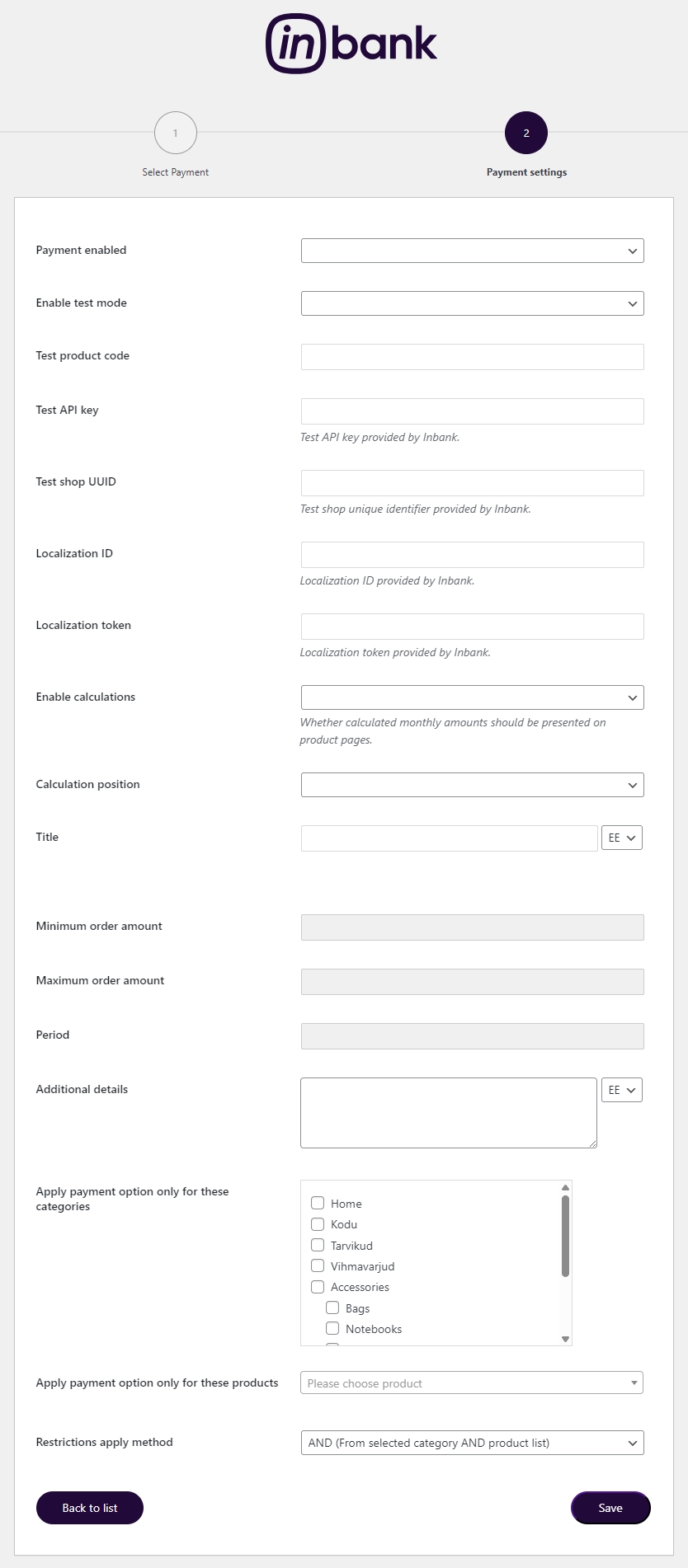
| Field | Description |
|---|---|
| Payment enabled | Whether this Inbank product appears as a payment method at checkout. |
| Enable test mode | Select whether the module should be connected to test API for testing purposes. If the parameter is not enabled, the module connects to the live API. This parameter defines whether next you need to set the API key, UUID and product code for the live or test environment. |
| Live product code / Test product code | The product code provided by Inbank. This code defines the credit conditions offered at checkout. This parameter is prefilled from Step 1 , but you can change the Product Code here if needed. |
| Live API key / Test API key | The unique key of the shop used for building API requests through which the shop communicates with Inbank. This parameter is prefilled from Step 1 , but you can change the API key here if needed. |
| Live shop UUID / Test shop UUID | The API authentication key. The API key should be kept private. This parameter is prefilled from Step 1, but you can change the UUID here if needed. |
| Localization ID | ID of the set of translations required for the module. Translations are available in Estonian, Polish, English, Latvian, Czech, Russian and Lithuanian. This parameter is prefilled from Step 1 , but you can change the Localization ID here if needed. |
| Localization token | Token required to access the translations for storefront texts. This parameter is prefilled from Step 1, but you can change the Localization token here if needed. |
| Title | The payment method title that is displayed to customers at checkout. The recommended Title length is 65 characters. The default Title is defined by the Product code. You can customize it for Inbank Hire Purchase Estonia, Inbank HP Flex Estonia, Inbank Hire Purchase Poland, Inbank HP Flex Poland, Inbank Hire Purchase Czech Republic, Inbank Green Energy Czech Republic, Inbank Hire Purchase Latvia, Inbank HP Flex Latvia, Inbank Hire Purchase Lithuania and Inbank Moki Lithuania products, in which case the default value will be displayed under the Title field. If you set a different Product code, your custom value will be overridden with the new default one, which can then be customized. |
| Enable calculations | Whether calculated monthly amounts should be presented on product pages. If enabled, preliminary calculations of monthly payments will appear on the pages of products within the minimum-maximum range for this Product code. |
| Calculation position | The exact place where the Inbank monthly payment calculation will be displayed. Available options: - Product summary - Before add to cart button - After add to cart button - After add to cart form - Before product meta data - After product meta data - Share section - Custom action: woocommerce_inbank_custom. This setting can be used to define a custom location for Inbank's product page calculations. |
| Minimum Order Amount | The minimum order amount for which the payment method is available. The value is defined by the product code. For sums below this value, the payment method is not displayed. |
| Maximum Order Amount | The maximum order amount for which the payment method is available. The value is defined by the product code. For sums above this value, the payment method is not displayed. |
| Period | The period options in months for which credit under this payment method is granted. The values are defined by the product code. |
| Additional details | The consent message displayed under the payment method at checkout. The default Additional details are defined by the Product code. You can customize it, then the default value will be displayed under the Additional details field. |
Once you've added all needed Inbank payment products to your shop you can pick and choose which products or product categories Inbank payment products are applicable to. By default, the payment products have no restrictions set.
The restrictions configuration is available at Settings > Inbank. Click Edit next to the payment method you wish to set the restrictions for, the bottom of the page will then contain the needed configuration options. Once you are all set, just click Save.
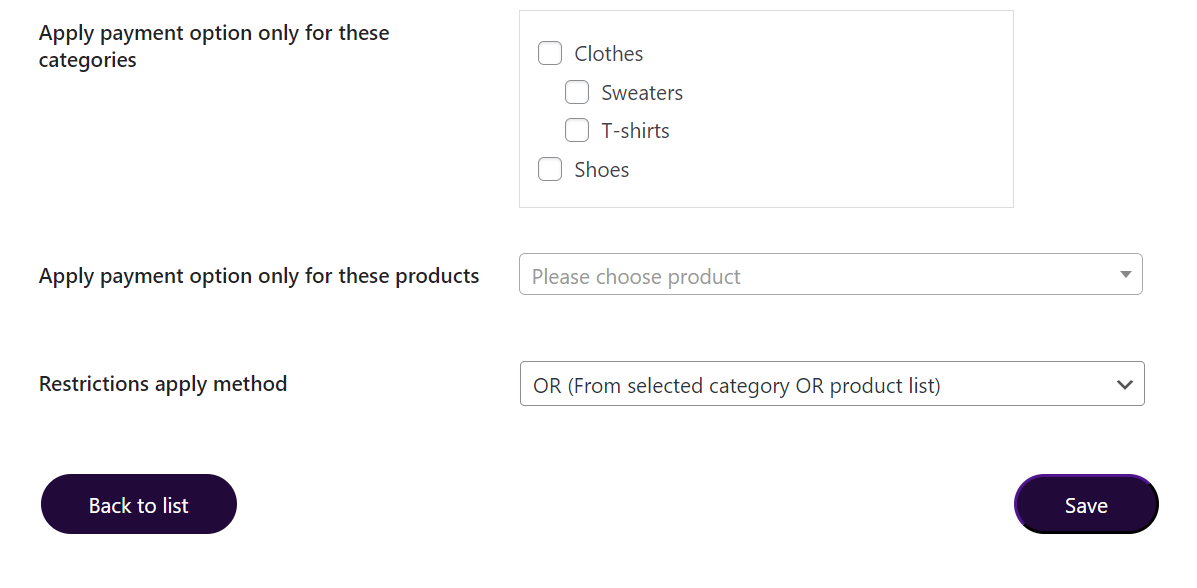
Restrictions can be set by product categories or by certain products only. In both cases you can select one or several categories/products.
The are two restriction rules available:
- AND, products must be present in selected category and product restrictions. If this rule is applied, the Inbank payment method will be available only for those products which belong to the category(s) selected in the Category restrictions and at the same time listed under the Product restrictions. If there are no products listed under Product restrictions, the payment method will be applicable to all products under the category(s) listed in the Category restrictions. This rule is selected by default.
- OR, products can be present in selected category or product restrictions. If this rule is applied, the Inbank payment method will be available for all products which belong to the category(s) selected in the Category restrictions and all products listed under the Product restrictions even if they are from different categories. If there are no products listed under Product restrictions, the payment method will be applicable to all products, regardless of their category.
Inbank provides a dedicated staging environment for testing the integration with payment solutions. For testing purposes, you need to specify several parameters in the payment method settings at Settings > Inbank. When adding a new payment option you need to:
- Switch on the Enable test mode parameter
- Specify the Test API key
- Specify the Test shop UUID
- Specify the Test product code The Test API key, Test shop UUID and Test product code are provided by Inbank.
For testing purposes, the system returns preconfigured decisions:
- For Inbank Hire Purchase Estonia, Inbank Split into parts Estonia, Inbank HP Flex Estonia, Inbank Hire Purchase Latvia, Inbank HP Flex Latvia, Inbank Hire Purchase Lithuania, Inbank Moki Lithuania, Inbank Split into parts Latvia, Inbank Hire Purchase Czech Republic, Inbank Green Energy Czech Republic, Inbank HP Flex Poland and Inbank Hire Purchase Poland payment products, positive decisions are given for amounts 0 - 500, 15 000 - 16 000.
The credit application process may include an OTP code exchange via SMS. The demo environments do not send out SMS messages. If you are testing Inbank Split into parts Estonia or Inbank Split into parts Latvia payment products, the SMS message is hardcoded to value 0000.
Testing Inbank Payments Estonia products
To test the financing products in Estonia, you can safely use your own Estonian ID-code and ID-card, as the demo environment does not initiate real binding contracts. Alternatively, you can use our demo user, the identity code of which is 10101010005. Besides the identity code, you will also need a name and a unique phone number for authentication and signing.
To use an ID-card or Mobile-ID in the demo environment, you need to register them at:
- ID-card - https://demo.sk.ee/upload_cert/
You can also use Smart-ID by downloading the following apps:
To use Smart-ID for testing, your account level should be 'Qualified'. You can check the account level at https://sid.demo.sk.ee/portal/login.
There are a couple of things which can be updated in the Pay Later Platform:
Plugin updates. The current version of the plugin contains all the functionality required to offer Inbank payment methods to customers. In the future we plan on adding new payment products to the plugin, as well as features to improve existing functionality. Updating the plugin to the latest version will support added features and keep your store up to date with the latest enhancements from Inbank to make purchases even smoother for your customers.
API data updates. The plugin retrieves data from Inbank regarding the conditions of payment products offered to customers. This data can undergo changes on the Inbank side. If such changes occur, product parameters should also be updated in the plugin, for the customers to successfully use Inbank payment methods.
Plugin settings updates. The payment product which is offered to customers depends on the product code set for the payment method. If at any point you need to change the product code or any other plugin configurations, this can be easily done through the plugin settings.
The following sections cover all the update procedures.
If a new version of the Pay Later Platform for WooCommerce comes out and you want to make use of the functionality it offers, updating the plugin is quick and easy. You can download the latest version of the plugin from here.
Do not worry about the configuration settings. While the plugin is updated, all settings, including API keys, product codes, etc., are migrated into the new version of the plugin.
- Go to Plugins > Installed plugins and deactivate and delete the current version of Pay Later Platform by Inbank.
- Go to Plugins > Add new.
- Click the Upload plugin button at the top of the page.
- Click Choose File and select the updated version of the plugin in .zip format.
- Click Install Now to start the installation process.
- Once the new version is installed, click Activate Plugin.
After you set a product code for an Inbank payment method, the plugin retrieves product related parameters via API from Inbank. Inbank can make changes to these data and the changes need to be synchronized with the settings of the plugin. Of course, you do not need to keep track of the possible updates, the Pay Later Platform will check for updates and apply them to your store.
Configuration parameters which can receive updates:
- Title
- Minimum order amount
- Maximum order amount
- Period
- Marketing message
- Additional details
You can also manually have the Inbank plugin check for updates whenever you need. To do this just go to Settings > Inbank and click Update products. The plugin will update the configuration settings and that is it! Now your plugin has all the latest data from Inbank.
If at any point you need to make changes to the plugin settings, you can access the configuration at Settings > Inbank.
To update the settings for the Pay Later Platform, make the required changes to the payment method configuration and click Save changes.
That is it. Your plugin settings are now updated.
This section showcases how Inbank payment methods work at checkout.
Note that the following screenshots are only demonstrational. The actual way the Inbank payment methods appear in your WooCommerce store depends on the storefront theme, plugin settings, the Inbank branch with which you have concluded the contract and the locale of your store.
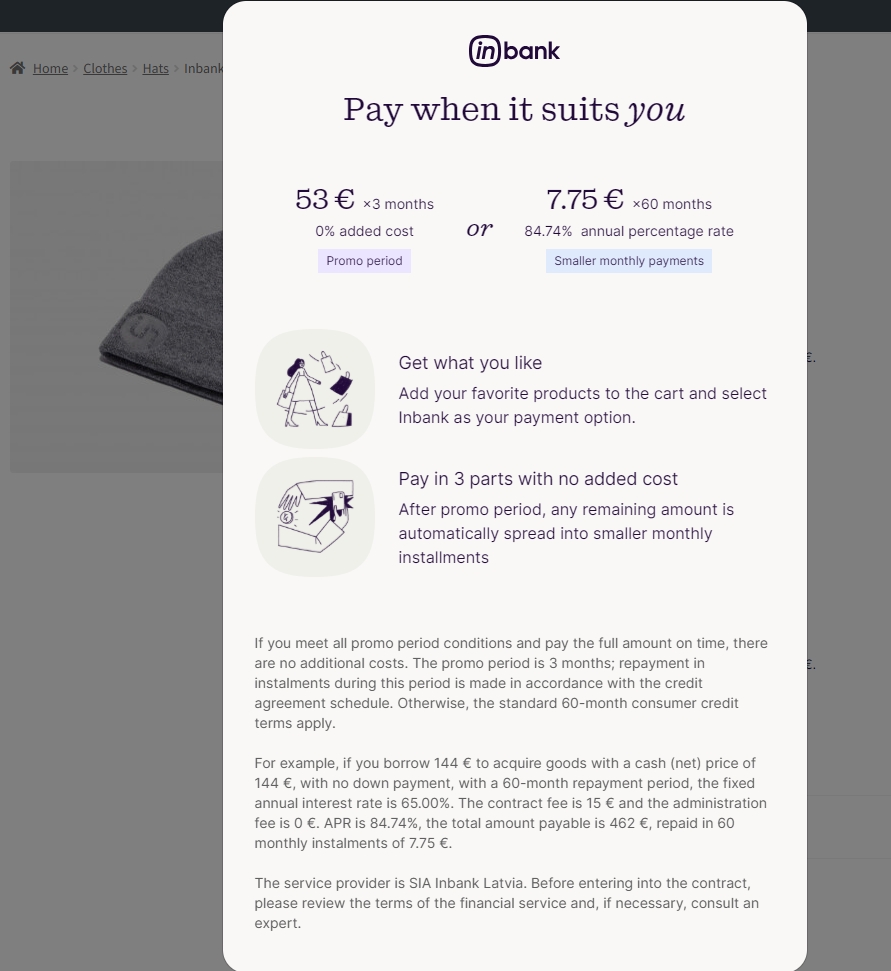
On the product page, the Inbank installment calculator is displayed as a JS calculator highlighting the estimated monthly payment.
When the customer clicks on the calculator, a calculator modal opens, allowing the customer to explore the available financing options interactively, especially for Hire Purchase type payment options.
The modal also displays detailed information about the financing terms, including contract fee, administration fee, and the annual percentage rate (APR).
This allows the customer to clearly understand the financing conditions and choose the payment plan that best fits their needs before proceeding to checkout.
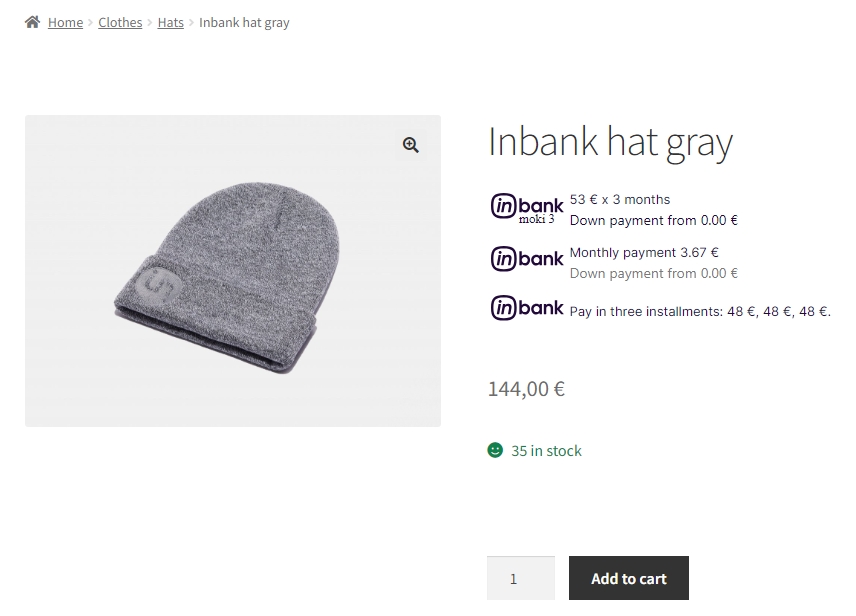
Pictured below: pop-up window for the Inbank Hire Purchase / Inbank Split into parts payment product.
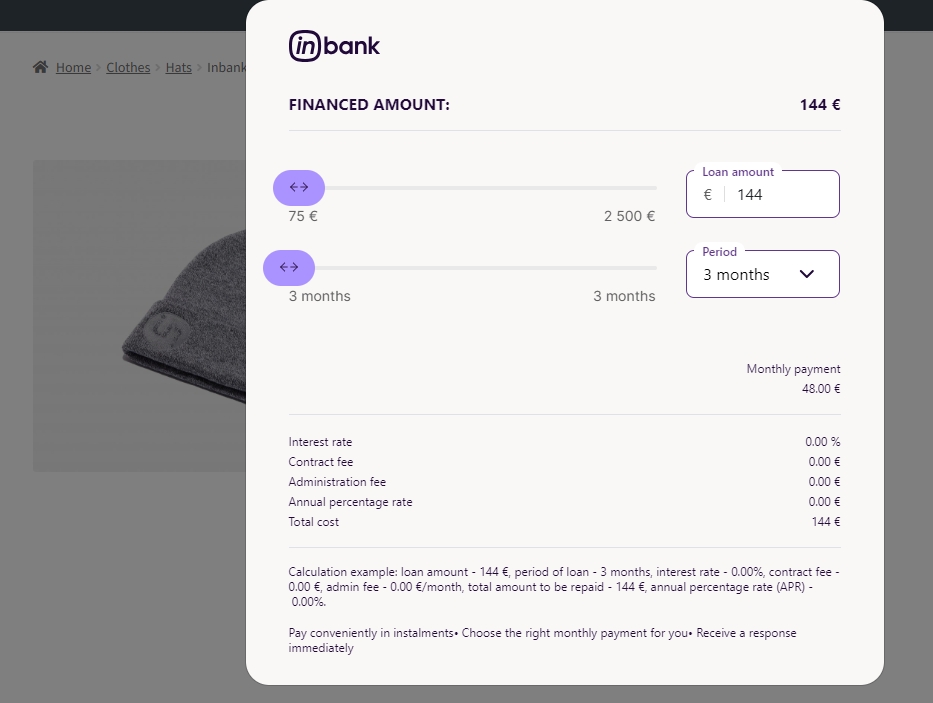
Pictured below: pop-up window for the Inbank Moki / Inbank HP Flex payment product.
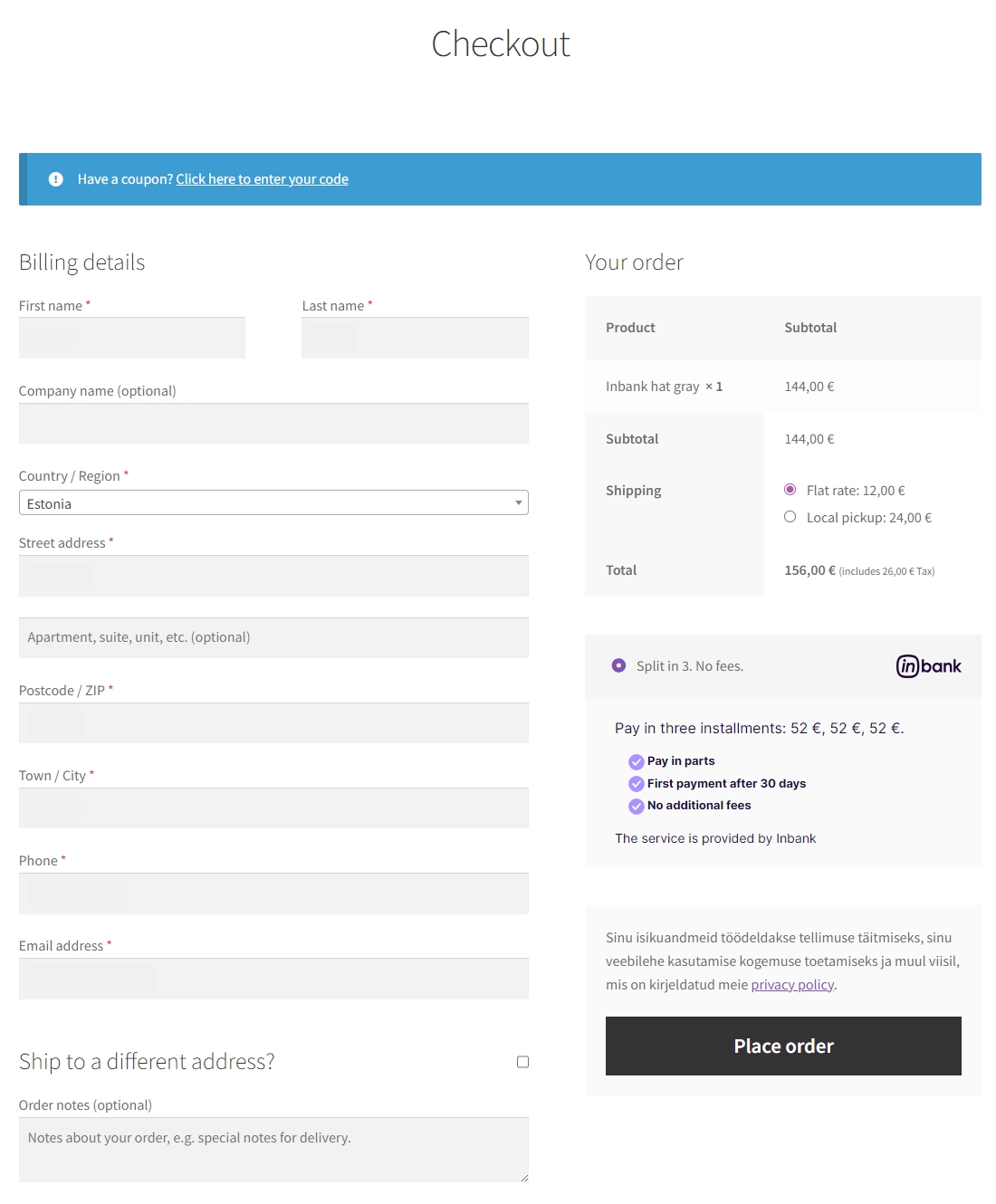
At checkout, the available Inbank payment products (based on the delivery country) appear as payment methods.
When the customer selects an Inbank payment method, the respective payment details are displayed.
Clicking on these payment option details opens the calculator modal, where the customer can review the financing details just as on the product page, but reflecting the total cart value instead of a single product price.
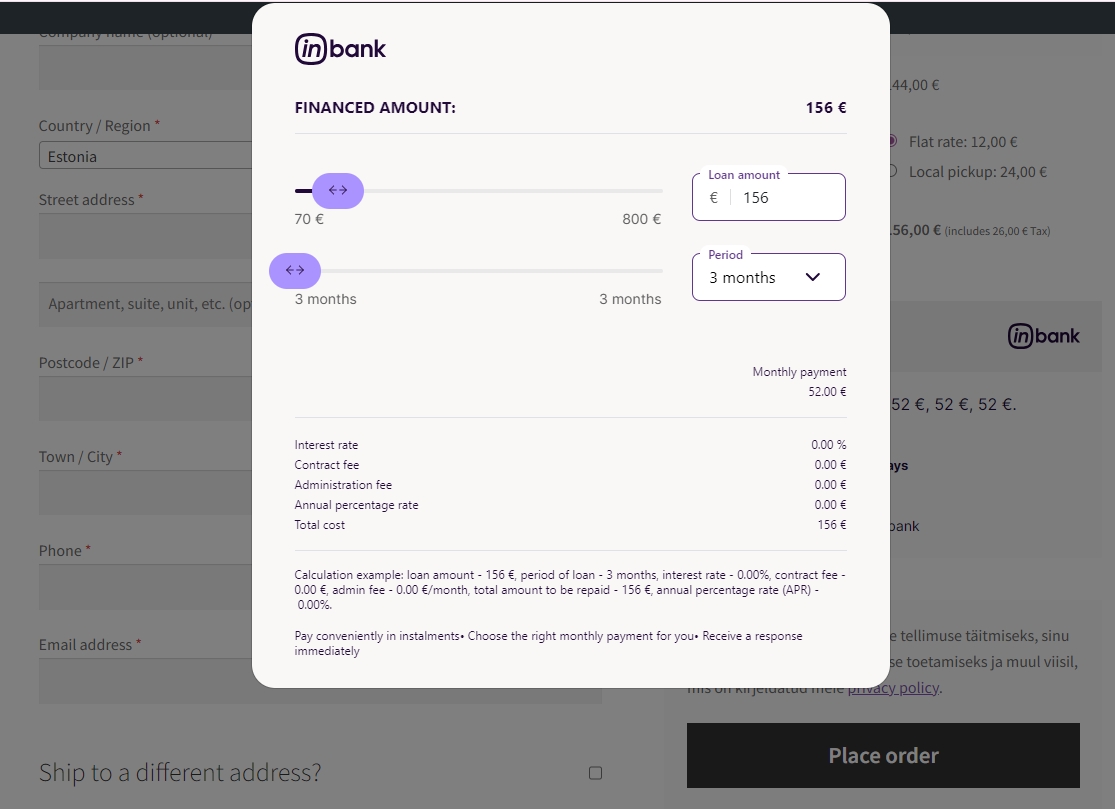
Once customers choose Inbank products as their payment method and click Place order, they are redirected to the Inbank e-POS environment. Here customers go through a number of dialogs to complete the financing of the purchase.
After completing the procedure in Inbank e-POS, customers are redirected back to the shop.
If the purchase has been financed by Inbank, the customer will be redirected to the page configured in your WooCommerce instance as the payment success page. Otherwise, the customer will be redirected back to the cart where they can choose an alternative payment method.
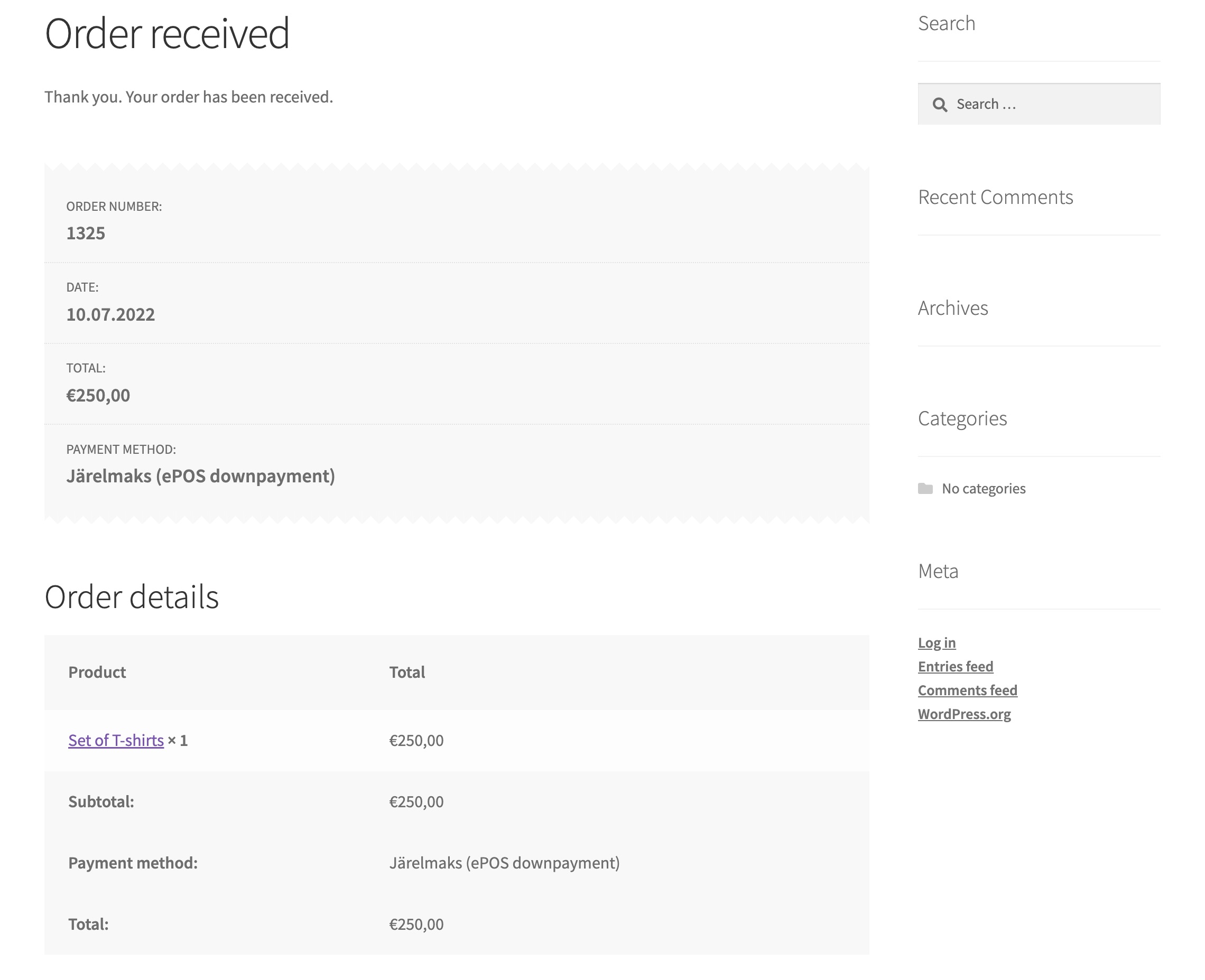
Payment transactions can be viewed at WooCommerce > Orders.
Until the credit contract has been signed by the customer and approved by Inbank for financing, it remains in status Pending payment.
Orders which have been successfully financed by Inbank receive status Processing.
If the flow is configured to require merchant approval prior to concluding the credit contract, the order which has been approved by Inbank for financing receives status On hold. In this state the order awaits the merchant's approval or cancellation. If the merchant approves the contract, the order receives status Processing. Contracts are approved and cancelled through the Inbank Partner Portal.